Powitanie nowego dziecka w domu to niekończąca się radość i bardzo mało snu. Znalezienie odpowiednich środków do opieki nad maluchem pozwala nieco odciążyć się. Dzięki temu możesz pozostawać w kontakcie bez obaw o bezpieczeństwo. Równowaga między łatwymi w obsłudze funkcjami a niezawodnym sprzętem sprawia, że codzienne życie Twojej powiększającej się rodziny staje się znacznie łatwiejsze. Warto rozważyć niania elektroniczna, aby dodatkowo wspomóc komfort i bezpieczeństwo rodziców.
Najważniejsze wnioski
Wybór odpowiedniego wyposażenia zaczyna się od jasnego określenia potrzeb związanych z pokojem dziecięcym. Poniższe wskazówki przedstawiają najważniejsze cechy, na które warto zwrócić uwagę podczas zakupów.
-
Prywatność przede wszystkim: Sieć lokalna (FHSS) jest często lepiej zabezpieczona przed atakami hakerów niż Wi-Fi.
-
Jakość dźwięku: Słyszenie czystego dźwięku jest równie ważne jak widzenie wyraźnego obrazu.
-
Zasięg sygnału: Grube ściany mogą zakłócać sygnał, dlatego warto wybierać urządzenia o dużym zasięgu.
-
Żywotność baterii: Jednostka rodzicielska powinna działać przez całą noc bez konieczności ciągłego podłączania do prądu.
-
Prosta konfiguracja: Dobra technologia powinna działać od razu po wyjęciu z pudełka, bez skomplikowanych aplikacji.
Dla świeżo upieczonych rodziców warto też spojrzeć na niania elektroniczna ranking, aby wybrać najlepsze elektroniczne nianie odpowiadające ich potrzebom. Wczesne ustalenie tych priorytetów sprawia, że proces zakupów jest znacznie mniej przytłaczający i pozwala skupić się na radości z nowego członka rodziny.
Spokój ducha w erze cyfrowej
Czuwanie nad śpiącym dzieckiem ewoluowało od nasłuchiwania płaczu do oglądania krystalicznie czystego obrazu. Obecnie na rynku dostępne są systemy, które zapewniają szczegółowy obraz, jednocześnie chroniąc prywatność Twojego domu przed ujawnieniem w Internecie. Warto rozważyć inteligentna niania elektroniczna, aby połączyć wygodę monitorowania z bezpieczeństwem.
| Obawa |
Nowoczesne rozwiązanie |
Korzyść |
| Włamania do baz danych |
Sygnały FHSS bez Wi-Fi |
Sygnały pozostają w Twoim domu i nie są dostępne w Internecie. |
| Opóźnienie sygnału |
Sprzęt o niskim opóźnieniu |
Widzisz i słyszysz ruchy w czasie rzeczywistym, bez żadnych opóźnień. |
| Wyrazistość obrazu |
1080p Full HD |
Możesz sprawdzić, czy dziecko ma otwarte oczy i czy oddycha swobodnie. |
Wykorzystanie odpowiedniej technologii daje swobodę wykonywania prac domowych, a także pozwala poprawić jakość snu. Wysoki poziom prywatności i rozdzielczość obrazu gwarantują bezpieczeństwo Twoich bliskich, a Tobie pozwalają pozostać z nimi w kontakcie.
Różne rodzaje nianii elektronicznych
Zapoznanie się z dostępnymi kategoriami to pierwszy krok do wyboru niania elektroniczna, która najlepiej pasuje do Twojego stylu życia. Różne warunki mieszkaniowe, a także indywidualne potrzeby rodzicielskie, prawdopodobnie wymagają różnych metod monitorowania dziecka. Wśród nich warto wyróżnić elektroniczna niania z kamerą, która umożliwia pełną kontrolę zarówno nad dźwiękiem, jak i obrazem.
Modele wyłącznie audio
Są to klasyczne monitory, które przekazują dźwięk, ale nie wyświetlają obrazu. Są niedrogie, charakteryzują się niesamowitą żywotnością baterii i idealnie nadają się dla rodziców, którzy nie czują potrzeby wpatrywania się w ekran. Ponieważ zużywają mniej danych, ich zasięg jest często znacznie większy niż w przypadku modeli z funkcją wideo. To właśnie te modele klasyczne najlepiej spełniają rolę niania elektroniczna w prosty, funkcjonalny sposób.
Monitory wideo bez Wi-Fi
Systemy te wykorzystują specjalny sygnał (często nazywany FHSS) do przesyłania obrazu bezpośrednio z kamery na ekran urządzenia przenośnego. Nie łączą się one z internetem, co sprawia, że zhakowanie ich z zewnątrz domu jest praktycznie niemożliwe. Stanowią one najlepszy wybór dla rodzin, które oczekują rozwiązania typu „plug and play”. Warto rozważyć niania elektroniczna bez Wi-Fi, aby połączyć wygodę monitorowania z maksymalną prywatnością.
Systemy z obsługą Wi-Fi
Kamery te łączą się z domową siecią internetową i umożliwiają obserwowanie dziecka za pośrednictwem aplikacji na smartfonie. To doskonałe rozwiązanie dla rodziców, którzy pracują poza domem i chcą sprawdzić, co u dziecka w ciągu dnia. Jednak ich działanie w dużym stopniu zależy od szybkości połączenia internetowego, a dla zapewnienia bezpieczeństwa wymagają one silnych haseł. Wśród dostępnych opcji warto wyróżnić niania elektroniczna z kamerą, która umożliwia pełną kontrolę nad obrazem i dźwiękiem, nawet zdalnie.
Wybór między tymi rozwiązaniami zależy od tego, czy wolisz wygodę korzystania z aplikacji na smartfonie, czy też niezawodność i prywatność, jaką zapewnia ręczny monitor działający w trybie zamkniętym.
Najważniejsze cechy, na które należy zwrócić uwagę przy wyborze niani elektronicznej (niezbędne funkcje)
Skupienie się na podstawowych funkcjach, które działają bez zarzutu, to najlepszy sposób na znalezienie niezawodnej niani elektronicznej. Zwrócenie uwagi na te konkretne parametry pomoże Ci znaleźć wysokiej jakości sprzęt, który bez problemu poradzi sobie z codziennymi zadaniami. Warto też wiedzieć, jak wybrać najlepszą nianię elektroniczną, aby połączyć niezawodność z komfortem użytkowania.
-
Wideo w wysokiej rozdzielczości (wyraźny obraz w ciągu dnia): Warto wybrać rozdzielczość co najmniej 720p HD, a jeśli zależy Ci na wyraźniejszych szczegółach twarzy i ostrzejszym obrazie, rozważ rozdzielczość 1080p Full HD.
-
Noktowizja o wysokiej rozdzielczości: Większość monitorowania odbywa się w ciemności, więc kamera, która w nocy daje ziarnisty obraz, nie jest zbyt przydatna. Poszukaj niewidocznych diod LED na podczerwień, które nie obudzą dziecka.
-
Rozmowa dwustronna: Możliwość uspokojenia dziecka swoim głosem z innego pokoju często pozwala uniknąć jego całkowitego przebudzenia.
-
Duży rozmiar ekranu: Ekran o przekątnej 5–5,5 cala to idealny kompromis, pozwalający dostrzegać szczegóły, a jednocześnie sprawiający, że urządzenie nie jest zbyt nieporęczne, by nosić je przy sobie na co dzień.
-
Czujniki temperatury: Niemowlęta zazwyczaj najlepiej śpią, gdy w pokoju panuje bezpieczna i komfortowa temperatura, dlatego wbudowany termometr pozwala szybko zauważyć, czy w pomieszczeniu robi się zbyt ciepło lub zbyt chłodno. Zazwyczaj zalecana temperatura wynosi około 68–72°F (20–22°C).
-
VOX / Tryb aktywacji dźwiękowej: Ekran VOX (aktywowany dźwiękiem) włącza wyświetlacz tylko wtedy, gdy dziecko wydaje dźwięk, co pozwala również wydłużyć czas pracy baterii podczas użytkowania w nocy.
-
Bezpieczne połączenie: W przypadku monitorów bez obsługi Wi-Fi należy zwrócić uwagę na bezpieczne połączenie w paśmie 2,4 GHz w standardzie FHSS; w przypadku monitorów z obsługą Wi-Fi należy priorytetowo traktować produkty zapewniające silne szyfrowanie (np. 256-bitowe).
-
Rzeczywisty czas pracy na baterii: Zwróć uwagę przede wszystkim na monitory przeznaczone do całodobowego użytkowania (często ponad 12 godzin), ponieważ krótki czas pracy na baterii to jedna z najczęstszych przyczyn codziennych irytacji.
Inteligentna niania elektroniczna, która spełnia wszystkie te wymagania, zaspokoi 90% Twoich codziennych potrzeb. Skupienie się na tych podstawowych kwestiach gwarantuje, że nie zapłacisz więcej za zbędne dodatki, które w rzeczywistości nie przyczyniają się do zapewnienia dziecku bezpieczeństwa.
Zaawansowane funkcje dodatkowe w nianiach elektronicznych
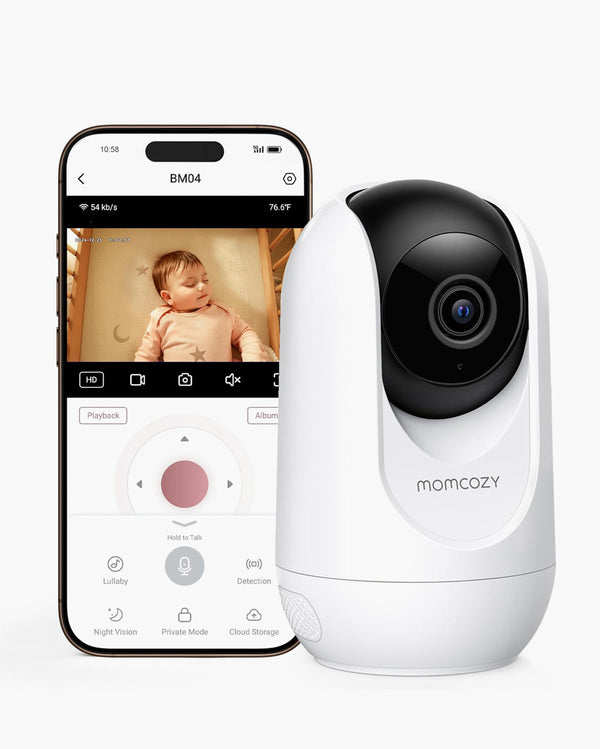
Kiedy już opanujesz podstawy, kilka nowoczesnych udogodnień może znacznie ułatwić Ci życie. Funkcje te nie są absolutnie niezbędne, ale zapewniają dodatkowy komfort, za który wielu rodziców uważa, że warto zapłacić więcej. Warto rozważyć elektroniczna niania z kamerą, aby monitorowanie dziecka było bardziej wszechstronne i wygodne. Taka niania pozwala również na zdalne sterowanie kamerą do pokoju dziecka, co zwiększa komfort codziennej opieki.
Obrotnica, pochylenie i zoom (PTZ)
Gdy niemowlęta stają się małymi dziećmi, zaczynają poruszać się po łóżeczku, a nawet po całym pokoju. Kamera do pokoju dziecka, którą można zdalnie sterować za pomocą jednostki rodzicielskiej, pozwala śledzić ruchy dziecka bez konieczności wchodzenia do pokoju i ryzykowania, że je obudzisz. Ta funkcja jest szczególnie przydatna, jeśli planujesz korzystać z monitora przez kilka lat.
Obsługa wielu kamer
Jeśli masz bliźniaki lub planujesz wkrótce powiększyć rodzinę, poszukaj systemu, który umożliwia podłączenie drugiej lub trzeciej kamery do tego samego urządzenia ręcznego. Niektóre monitory oferują tryb „podzielonego ekranu”, dzięki czemu możesz obserwować dwa pokoje jednocześnie. Taki system najlepiej realizuje elektroniczna niania z kamerą, która pozwala na kontrolę wielu pomieszczeń bez komplikacji.
Monitorowanie snu & oddychania
Najnowocześniejsze inteligentna niania elektroniczna wykorzystuje obecnie sztuczną inteligencję do śledzenia oddechu i wzorców snu dziecka bez konieczności stosowania czujników noszonych na ciele. Może powiadomić rodziców, jeśli nie wykryje żadnego ruchu, lub przedstawić poranny raport na temat tego, jak dziecko spało. Choć jest to funkcja z wyższej półki, daje nieocenione poczucie bezpieczeństwa zaniepokojonym świeżo upieczonym rodzicom.
Wbudowane funkcje uspokajające
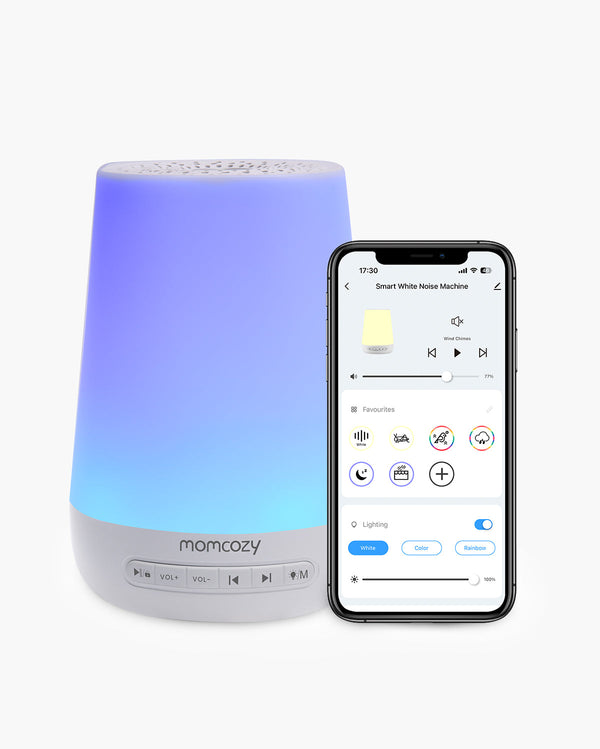
Niektóre zaawansowane modele pełnią funkcję urządzenia 2 w 1, ponieważ są wyposażone w lampkę nocną oraz generator białego szumu lub odtwarzacz kołysanek. Dzięki temu w pokoju dziecięcym panuje większy porządek, a regulacja otoczenia do snu odbywa się bezpośrednio z monitora. Takie rozwiązanie sprawdza się w przypadku najlepsze elektroniczne nianie, które oferują kompleksowe wsparcie dla rodziców i dziecka.
Sterowanie zdalne przez aplikację
Program pory na sen
7-kolorowe oświetlenie LED
34 dźwięki
Dzięki tym funkcjom elektroniczna niania z kamerą może stać się nie tylko zwykłym urządzeniem do obserwacji niemowląt, ale także długoterminowym zabezpieczeniem w domu, które pozwoli Ci uniknąć konieczności zakupu całego systemu w przyszłości.
Funkcje nianii elektronicznej, których należy unikać
Warto też pamiętać, że więcej technologii nie zawsze oznacza lepsze rozwiązanie. Niektóre funkcje mogą raczej potęgować stres, zamiast go zmniejszać. Ważne jest, aby nauczyć się wybierać te funkcje, które nie przyczyniają się do zmęczenia spowodowanego „fałszywymi alarmami”. Warto przy tym wiedzieć, że niania elektroniczna powinna być przede wszystkim prosta i intuicyjna w użytkowaniu.
Czułe na ruch podkładki & urządzenia do noszenia
Urządzenia wymagające fizycznego kontaktu (takie jak czujniki lub skarpetki) są znane z tego, że uruchamiają głośne alarmy tylko dlatego, że dziecko zmieniło pozycję lub skarpetka zsunęła się. Często powoduje to więcej paniki niż spokoju ducha. W takich przypadkach prostsza niania elektroniczna sprawdza się lepiej, eliminując niepotrzebne powiadomienia.
Efektowna analiza nastroju oparta na sztucznej inteligencji
Podchodź sceptycznie do inteligentna niania elektroniczna, która rzekomo „tłumaczy” płacz dziecka lub analizuje jego nastrój. Funkcje te często nie mają naukowego potwierdzenia i mogą skłaniać do nadmiernej analizy normalnych zachowań niemowlęcia. (Uwaga: Podstawowe monitorowanie snu może być przydatne, ale „rozpoznawanie nastroju” to zazwyczaj tylko chwyt marketingowy.)
Sprzęt z abonamentami na oprogramowanie typu “ransomware”
Niektóre urządzenia monitorujące oferują podstawowe funkcje w ramach abonamentu miesięcznego, takie jak odtwarzanie dźwięku w tle, powiadomienia o ruchu czy monitorowanie snu. Zawsze sprawdź, czy urządzenie działa w pełni zaraz po wyjęciu z opakowania, bez konieczności podawania danych karty kredytowej. W tym kontekście warto wybierać najlepsze elektroniczne nianie, które działają od razu po zakupie i nie wymagają dodatkowych opłat ani instalacji.
Małe ekrany (poniżej 4 cali)
W 2026 roku ekrany mniejsze niż 4 cale staną się przestarzałe. O drugiej w nocy trudno stwierdzić, czy oczy dziecka są rzeczywiście otwarte, gdy patrzy się na ziarnisty, malutki wyświetlacz. W takich sytuacjach prostsza niania elektroniczna pozwala skupić się na tym, co naprawdę liczy się w roli rodzica. Ostatecznie najprostsze i najbardziej niezawodne narzędzia zazwyczaj okazują się skuteczniejsze od tych najbardziej efektownych gadżetów.
Jak zadbać o prywatność swojego połączenia
Bezpieczeństwo to nie tylko kwestia zdrowia fizycznego, ale także bezpieczeństwa cyfrowego i ochrony danych Twojej rodziny. W 2026 roku hakerzy będą działać w coraz bardziej wyrafinowany sposób, dlatego wybór sprzętu musi być jeszcze bardziej przemyślany. W tym kontekście warto postawić na niania elektroniczna z Wi-Fi, która oferuje zaawansowane zabezpieczenia cyfrowe.
-
Priorytet dla bezpieczeństwa lokalnego (FHSS): W przypadku monitorów nieobsługujących sieci Wi-Fi standardowym zabezpieczeniem jest technologia FHSS (Spektrum rozproszone z przeskokiem częstotliwości). Technologia ta polega na ciągłej zmianie kanałów, co utrudnia przechwycenie sygnału bez fizycznej bliskości urządzenia.
-
Włącz uwierzytelnianie dwuskładnikowe (2FA): Jeśli korzystasz z monitora Wi-Fi, uwierzytelnianie dwuskładnikowe (2FA) jest absolutną koniecznością. Dzięki temu nawet jeśli ktoś wykradnie Twoje hasło, nie będzie mógł uzyskać dostępu do obrazu z kamery bez kodu z Twojego telefonu.
-
Natychmiast zaktualizuj oprogramowanie sprzętowe: Hakerzy wykorzystują luki w starszym oprogramowaniu. Niezależnie od tego, czy chodzi o stację rodzicielską, czy kamerę Wi-Fi, zawsze należy instalować najnowsze aktualizacje od producenta, aby załatać nowo wykryte luki w zabezpieczeniach.
-
Silne, niepowtarzalne hasła: Nigdy nie pozostawiaj kamery Wi-Fi z domyślnymi ustawieniami fabrycznymi. Zastąp “admin” lub “1234” złożonym, unikalnym hasłem, którego nie używasz do żadnego innego konta.
-
Skorzystaj z “Sieci dla gości”: Aby zapewnić dodatkowe bezpieczeństwo, podłącz swoją bezprzewodową niania elektroniczna z Wi-Fi do “sieci dla gości” routera. W ten sposób kamera zostaje odizolowana od komputerów osobistych i nośników danych, tworząc cyfrową zaporę ogniową.
-
Wyłącz dostęp zdalny (gdy nie jest potrzebny): Jeśli nie musisz koniecznie obserwować dziecka z zewnątrz domu, wyłącz w ustawieniach aplikacji funkcję “podgląd z dowolnego miejsca”, aby zablokować dostęp osobom z zewnątrz.
Niania elektroniczna z zabezpieczeniami działa jak zamknięty obieg, który pozostaje w obrębie Twojego domu. Dzięki zastosowaniu tych środków bezpieczeństwa masz pewność, że Twoje dziecko obserwują wyłącznie osoby, którym ufasz.
Rynek jest przepełniony różnymi produktami, dlatego warto mieć strategię, aby znaleźć niania elektroniczna ranking, który najlepiej odpowiada Twoim potrzebom i zapewnia najlepszy stosunek jakości do ceny. Przy zakupie artykułów dziecięcych nie należy kierować się wyłącznie ładnym opakowaniem, ale zwrócić uwagę na rzeczywistą jakość wykonania.
Sprawdź zweryfikowane recenzje
Nie skupiaj się wyłącznie na 5-gwiazdkowych recenzjach. Przejrzyj opinie oznaczone jako "Zweryfikowany zakup" z ostatnich 6 miesięcy, zwracając szczególną uwagę na oceny 3- i 4-gwiazdkowe. Te recenzje o średniej ocenie są często najbardziej szczere. Dzięki nim dowiesz się o rzeczywistych wadach produktu (np. “bateria wystarcza tylko na 6 godzin, a nie na 12”) bez stronniczości wynikającej z płatnych promocji lub gniewnych wypowiedzi. To praktyczne porównanie najlepszych nianii elektronicznych pomaga wybrać sprzęt odpowiadający rzeczywistym potrzebom.
Zapoznaj się z warunkami gwarancji & zasadami zwrotów
Warto wybrać produkt z 2-letnią gwarancją (lub przynajmniej roczną) oraz 30-dniowym okresem zwrotu bez podawania przyczyny. Monitory działają non stop. Baterie tracą wydajność, a sprzęt ulega awariom. Co ważniejsze, siła sygnału Wi-Fi zależy od ścian w Twoim domu. Potrzebujesz okresu próbnego, aby upewnić się, że urządzenie rzeczywiście sprawdzi się w Twoim konkretnym domu. W tym przypadku najlepiej postawić na najlepsze elektroniczne nianie, które oferują wsparcie gwarancyjne i sprawdzoną jakość.
Planowanie możliwości rozbudowy & podziału ekranu
Nie sprawdzaj tylko, czy obsługuje dodatkowe kamery; upewnij się, że monitor wspiera tryb podzielonego ekranu. Jeśli w przyszłości pojawi się drugie dziecko, nie chcesz monitora, który co 10 sekund “przełącza się” między kamerami. Chcesz widzieć oboje dzieci jednocześnie na jednym ekranie. Warto rozważyć zakup inteligentna niania elektroniczna, która pozwala na łatwe dodawanie kolejnych kamer i zarządzanie nimi w jednym urządzeniu.
Zakup produktów renomowanych marek, które zapewniają dedykowaną obsługę klienta, jest zazwyczaj lepszym rozwiązaniem niż wybieranie najtańszej opcji na zwykłej platformie handlowej. Dobra obsługa klienta może pomóc w szybkim rozwiązaniu problemów z sygnałem lub baterią.
Dlaczego firma Momcozy wyznacza wyższe standardy w dziedzinie nianii elektronicznych?
Niektóre marki skupiły się w szczególności na połączeniu prywatności, łatwości obsługi i najwyższej jakości obrazu. Firma Momcozy zyskała renomę dzięki projektom stworzonym z myślą o rodzicach, które rezygnują z zbędnych dodatków i stawiają na niezawodność. Dodatkowo, w portfolio Momcozy znajdziesz również praktyczne produkty wspierające codzienne życie rodziny, takie jak momcozy myjka do butelek, które ułatwiają dbanie o higienę niemowląt. Oto dwie wyróżniające się propozycje od Momcozy, które odpowiadają różnym stylom rodzicielskim.
| Funkcja |
Momcozy BM01 (Specjalista od prywatności) |
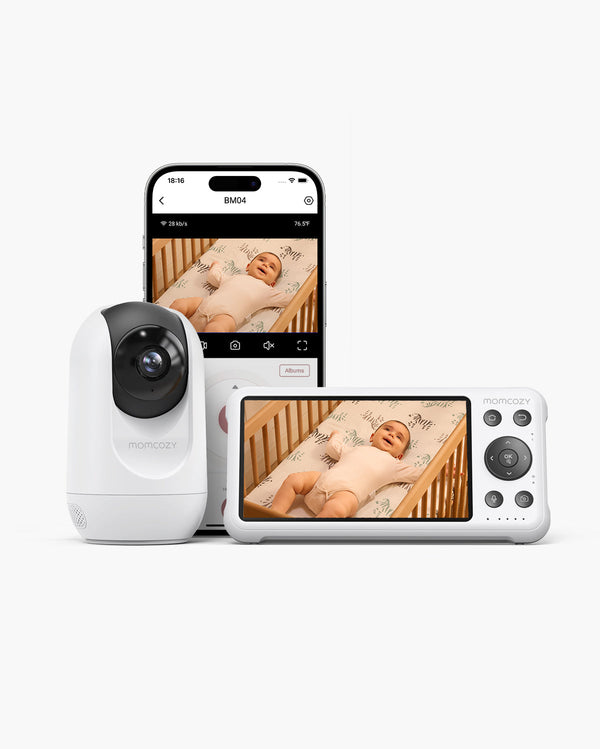
Momcozy BM04 (flagowy model hybrydowy) |
| Najlepsze dla |
Rodzice, dla których prywatność jest najważniejsza, a którzy cenią sobie prostotę i chcą uniknąć ryzyka ataków hakerskich. |
Współcześni/pracujący rodzice, którzy potrzebują zdalnego dostępu & możliwości monitorowania wielu dzieci. |
| Typ połączenia |
W 100% bez Wi-Fi (system zamknięty)
Film jest dostępny lokalnie; nie wymaga połączenia z internetem.
|
Tryb podwójny (Wi-Fi + bez Wi-Fi)
Lokalny monitor do użytku domowego + aplikacja do zdalnego podglądu.
|
| Zdalne widzenie |
Nie (wyłącznie do użytku domowego) |
Tak (dostęp z dowolnego miejsca za pośrednictwem aplikacji) |
| Ruch kamery |
Zdalne sterowanie obrotem, pochyleniem i zoomem |
Zdalne sterowanie obrotem, pochyleniem i zoomem |
| Widok z wielu kamer |
Tryb podzielonego ekranu & pętli |
Tryb podzielonego ekranu (wyświetlanie dwóch pomieszczeń jednocześnie) |
| Bezpieczeństwo |
Odporny na ataki sygnał lokalny FHSS |
Lokalny sygnał FHSS + strumieniowanie przez szyfrowaną sieć Wi-Fi |
| Inteligentne powiadomienia |
Podstawowy tryb VOX (dźwięk/płacz) |
Zaawansowana sztuczna inteligencja (strefy ruchu, płacz & ostrzeżenia o niebezpieczeństwie)) |
| Żywotność akumulatora |
~11,5 godziny (przy włączonym wyświetlaczu)
~22 godziny (tryb VOX)
|
10 godzin (ekran zawsze włączony)
20 godzin (tryb standardowy)
|
| Przedział cenowy |
Korzystna oferta w przystępnej cenie |
Najwyższa wszechstronność |
Krótka ocena:
-
Wybierz BM01, jeśli: Nie chcesz, żeby filmiki Twojego dziecka trafiały do sieci, i wolisz proste urządzenie typu “podłącz i używaj”, które doskonale radzi sobie z podstawowymi funkcjami.
-
Wybierz BM04, jeśli: Podróżujesz, pracujesz do późna lub masz kilkoro dzieci (albo planujesz je mieć) i potrzebujesz elastyczności, jaką daje możliwość sprawdzania sytuacji przez telefon oraz na monitorze z podzielonym ekranem.
Bez Wi-Fi
1080p Full HD
Długa Bateria
Tryb Podzielonego Ekranu
Aplikacja lub jednostka rodzica
Alert Strefy niebezpiecznej
Możliwość przechowywania
Tryb Vox
Każda rodzina ma swoje własne, niepowtarzalne rozwiązanie w domu. Niezależnie od tego, czy potrzebujesz modelu wyłącznie audio, innego rozmiaru ekranu, czy też konkretnych zestawów promocyjnych, zapraszamy do zapoznania się z pełną kolekcją nian elektronicznych Momcozy, aby znaleźć idealny produkt do pokoju dziecięcego.
Jak bezpiecznie korzystać z niani elektronicznej
Posiadanie najlepszego sprzętu na świecie nie pomoże, jeśli nie zostanie on prawidłowo zainstalowany w pokoju dziecięcym. Bezpieczeństwo zależy od tego, gdzie umieszczona jest kamera i jak reagujesz na powiadomienia. Oto kilka wskazówek, które pokażą Ci, jak używać niani elektronicznej w sposób maksymalnie bezpieczny.
-
Bezpieczeństwo związane z przewodem (zasada trzech stóp): Trzymaj aparat i wszystkie przewody zasilające w odległości co najmniej trzech stóp (1 metra) od łóżeczka. Niemowlęta mogą sięgnąć przez szczeliny i pociągnąć za zwisające przewody, co stwarza poważne ryzyko uduszenia. Porada eksperta: Użyj sztywnych osłon na przewody (osłon kablowych) przymocowanych do ściany, aby całkowicie ukryć zwisające przewody.
-
Bezpieczny montaż & wysokość: Zamontuj kamerę wysoko (najlepiej na wysokości co najmniej 1,8 m) na ścianie lub solidnej półce, aby uzyskać pełny widok “z góry”. Upewnij się, że jest dobrze zamocowana, tak aby nie spadła do strefy spania w razie uderzenia.
-
Inteligentne ustawienia czułości: Zamiast po prostu zwiększać głośność, dostosuj czułość funkcji VOX (aktywacja głosowa). Ustaw ją tak, aby uruchamiała się tylko w przypadku długotrwałego płaczu, odfiltrowując biały szum lub drobne szelesty. Zapobiega to “zmęczeniu alarmami”, a jednocześnie gwarantuje, że nigdy nie przegapisz prawdziwego przebudzenia.
-
Reguła: “Oczy na”: Pamiętaj, że niania elektroniczna to tylko narzędzie – nie zastąpi osobistej kontroli stanu dziecka. Jeśli zauważysz coś niepokojącego lub niania elektroniczna się rozłączy, zawsze kieruj się intuicją i natychmiast sprawdź, co dzieje się w pokoju.

Wybierz nianię elektroniczną, która zapewni całkowite bezpieczeństwo
Wybór odpowiedniego urządzenia sprawia, że cały dzień mija w spokoju. Stwórz dziecku bezpieczną przestrzeń do snu, zwracając uwagę na sygnały z czujników i wyraźny obraz wideo. Technologia powinna wspierać Twoją rodzinę, a nie zwiększać poziom stresu. Możesz się zrelaksować, mając pewność, że Twoje dziecko jest bezpieczne dzięki wygodnemu systemowi – niania elektroniczna z kamerą, która idealnie pasuje do układu Twojego domu i stylu życia.